Resetting a Garbage Disposal
Each InSinkErator comes with a red square overload protector.
Each InSinkErator comes with a red square overload protector.
This 1-minute video uses simple animation to show how to reset the garbage disposal's overload protector.
Disposers with EZ Connect
Your disposer is equipped with an automatic overload switch. If the disposer is controlled by a wall switch, turn off wall switch and allow disposer to cool for a period of up to 20 minutes before turning back on.
If disposer is controlled by a push button air switch, turn off and unplug disposer for a period of up to 20 minutes before plugging back in.
All Other Disposers
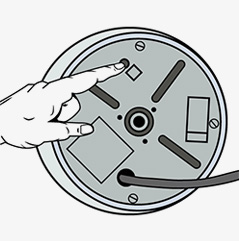
The overload protector is located under the sink, on the bottom of the garbage disposal, facing the floor.
The overload protector is located under the sink, on the bottom of the garbage disposal, facing the floor. It is a red square button. If the overload protector is tripped, you will see the red button dropped down about a quarter of an inch (5mm). Gently press the red button. If it does not stay up, wait ten minutes and try again.
Need additional help? Contact Us